Create Your EU Casino UK Account and Unlock the Welcome Offer

EU Casino has been operating since 2009 under UKGC and MGA licences. Creating an account takes three short steps - after that you get access to over 5,700 slots, live tables, daily promotions and the welcome offer. This page walks you through every part of the process: what data you need, how the form is structured, how to verify your email, and what happens after your first login.
ยฃ50 deposit ยท 50 free spins
Get Startedwith bonus

What You Get After Signing Up

Registration at EU Casino is not just access to games - it unlocks the full bonus structure. UK players who deposit at least ยฃ10 after sign-up receive 25 free spins on Big Bass Bonanza (wagering: 10x, 30-day deadline). European players get up to 100 mega spins at โ‚ฌ1 each for every euro deposited from a minimum of โ‚ฌ10 (wagering: 60x on spin winnings).

Beyond the welcome offer, a verified account gives you:

  • Daily Picks - personalised free spins or reload bonuses that refresh every day
  • Prize Twister - a free daily spin tool available without any deposit
  • Slot tournaments with prize pools up to 200 free spins
  • VIP points earned on every bet, exchangeable for real money
  • Access to six VIP tiers, with the top levels (Red Diamond) by invitation only

No bonus code is needed - all offers apply automatically when you meet the deposit threshold.

Register at EU Casino

What You Need Before You Start

EU Casino accepts players from the UK and major European markets including Sweden, Denmark and Germany. Before filling in the form, check two things:

Minimum age: You must be 18 or older. Age verification is mandatory under UKGC rules and is carried out during KYC before your first withdrawal.

Required information for the form:

Step Data required
Step 1 First name, last name, date of birth, gender, email, phone number
Step 2 Residential address, postcode, country of residence
Step 3 Username, password, optional deposit limit

Have your email address and phone number ready - both are used during verification. If you already have an account at another SkillOnNet casino (such as SlotsMagic or PlayOJO), you may be eligible for accelerated registration using existing credentials.

โœ“

EU Casino runs on the SkillOnNet platform, which means if you have an account at a sister brand, the registration process can be significantly shorter - the platform recognises returning users across its network.

Where to Find the Registration Button

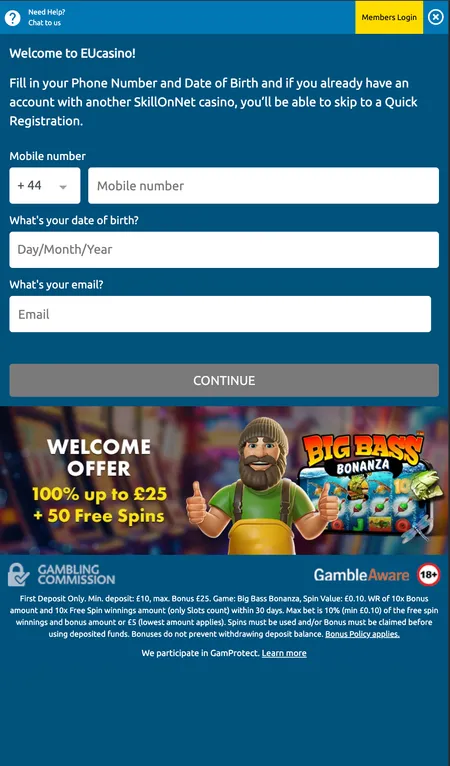
On desktop, the 'Register' button sits in the top-right corner of the site header, next to the login link. On mobile, the header shows a 'Need Help' chat shortcut alongside the sign-up prompt - the welcome banner for the Big Bass Bonanza UK offer is visible directly below.

The mobile registration flow starts slightly differently: you enter your phone number with country code and date of birth first, then proceed to email and password. The logic is the same across all devices - the platform just adapts the layout.

There is no dedicated iOS or Android app in the App Store or Google Play. The entire experience - including registration - runs through the mobile browser. The responsive site works on both iOS and Android without any APK download or manual installation.

How to Register at EU Casino

  1. EU Casino registration form first step

    Step 1 - Personal details: Enter your full name, date of birth, gender, email address and phone number. Double-check your email - this is where the confirmation link is sent.

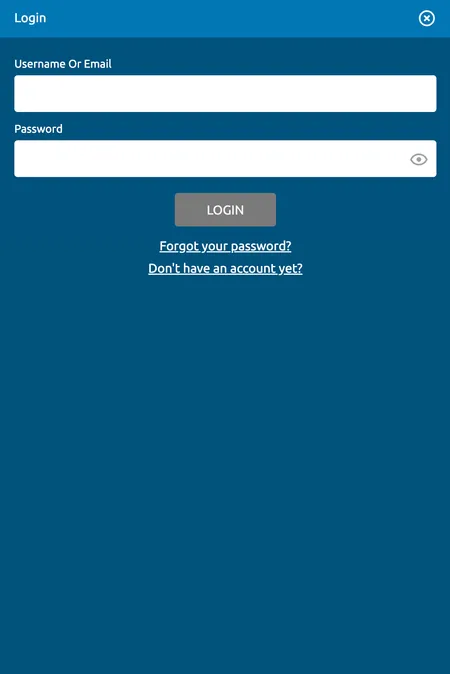
  2. EU Casino login screen after account creation

    Step 2 and beyond: Complete your address details, choose a username and password, then confirm account creation. After email verification, use the login screen to access your new account.

The Registration Form in Detail

The three-step form is straightforward, but a few fields deserve attention:

Password: The platform requires a secure password. Use a combination of uppercase letters, lowercase letters and numbers. Do not reuse a password from another account - especially since EU Casino stores financial data.

Deposit limit (Step 3): This is optional at registration but recommended. You can set a daily, weekly or monthly deposit cap directly in the form. You can also add or adjust limits later through 'My Account' settings.

Promo code field: No promo code is required for the standard welcome offer - it activates automatically on your first qualifying deposit. If you have a specific code (for example the Y520 code referenced in some promotional materials for a first deposit of ยฃ50 getting 100% up to ยฃ100 plus 50 spins), enter it in the cashier section after registration. Always verify current offer terms in the cashier before depositing.

Terms and conditions agreement: You must tick the box confirming you have read and accept the T&Cs and Privacy Policy before submitting the form.

Start Registration

Email Confirmation and Account Activation

After submitting the form, EU Casino sends a verification link to the email address you provided. Click that link to activate your account. Until confirmation, your account exists but may have limited functionality.

Common issues at this stage:

  • Email not arriving: Check your spam or junk folder first. If nothing appears within a few minutes, contact support via live chat.
  • Wrong email entered: You will need to contact support to correct this - the platform cannot auto-correct email addresses after submission.
  • Link expired: Verification links have a limited validity window. If yours has expired, request a new one through the login page or support.

Once your email is confirmed, log in with your username and password. The welcome bonus appears on your dashboard after your first qualifying deposit.

โœ•

UK residents cannot fund their casino account using a credit card - this is a UKGC regulatory requirement. Use a debit card, e-wallet (PayPal, Skrill, Neteller) or Trustly for deposits.

KYC Verification: What Happens After Registration

You can register, explore the lobby and even deposit without completing KYC. However, withdrawals require full identity verification. EU Casino requests the following documents:

Document type Details
Government-issued ID Passport or driving licence
Proof of address Utility bill dated within the last 6 months
Payment method proof Front of card (middle 8 digits masked) or e-wallet screenshot

Upload documents through 'My Account' - the 'Upload Documents' section. Standard review takes under 12 hours; complex cases may take up to 48 hours. If you have not received a response within that window, follow up via live chat or email at [email protected].

Some accounts may have an operator-imposed limit triggered by affordability or AML checks. In that case, you will need to provide source-of-funds documentation through the same upload section before the limit is lifted.

Create Your EU Casino Account

Security After Registration

EU Casino uses SSL encryption up to 128-bit on all data transmission between your browser and the casino servers. All payment methods comply with PCI DSS standards. The platform is licenced by three regulators - UKGC, MGA, and additionally in Denmark and Sweden - each requiring independent RNG audits and regular fairness checks.

Practical steps to secure your account after sign-up:

  • Use a unique password not shared with other services
  • Set a deposit limit immediately in account settings
  • Enable email notifications for logins and withdrawals
  • Familiarise yourself with the self-exclusion and session limit tools in the 'Responsible Gambling' section (accessible from the footer via GamProtect)

The minimum gambling age is 18. EU Casino enforces this through KYC, and accounts found to belong to underage users are closed. For support with problem gambling, BeGambleAware is available at gambleaware.org or by calling 0808 8020 133 (free, confidential).

For more on what EU Casino offers once you are registered, visit the home page for a full overview of games, bonuses and payment options.

First Login and Profile Setup

After email confirmation, your first login takes you to the account dashboard. Here you can see:

  • Current balance
  • Active bonuses and wagering progress
  • Transaction and bet history
  • Cashier (deposit, withdrawal, bonus codes)
  • Personal limits settings

If you forget your password, click 'Forgot Password' on the login screen. You will answer a security question, then receive reset instructions by email. Passwords are not stored in the system in retrievable form - the reset process is the only recovery route.

The slots and games section is immediately available after registration. Over 5,700 titles from 79 providers load directly in-browser - no software download needed.

Your EU Casino account is three steps away. Register now, verify your email and explore one of the largest slot libraries licenced under UKGC and MGA.

Registration FAQ

Do I need a bonus code to get the welcome offer?

No bonus code is required for the standard welcome offer. The UK offer (25 free spins on Big Bass Bonanza from ยฃ10 deposit) and the EUR offer (up to 100 mega spins) both apply automatically. If you have a specific promo code, enter it in the cashier after registration.

Can I register if I already have an account at SlotsMagic or PlayOJO?

All three brands run on the SkillOnNet platform. You cannot hold duplicate accounts, but if your existing account is at a sister brand, you may qualify for accelerated sign-up. Contact support for clarification before registering.

What documents does EU Casino request during KYC?

A government-issued photo ID (passport or driving licence), proof of address (utility bill no older than 6 months), and proof of your payment method (front of card with middle 8 digits masked, or an e-wallet screenshot showing your account number and email).

How long does account verification take?

Standard KYC review takes under 12 hours. Complex cases may take up to 48 hours. If you have not received a response within that window, contact support at [email protected] or via live chat.

Can UK players use PayPal to register and deposit?

Yes. UK players can deposit and withdraw using PayPal. Credit cards are not permitted under UKGC rules, but debit cards, PayPal, Skrill, Neteller and Trustly are all available.

Is there an EU Casino mobile app for registration?

There is no dedicated iOS or Android app. Registration and all account functions are available through the mobile browser on any smartphone or tablet - no APK download is needed.

What happens if my verification email does not arrive?

Check your spam or junk folder first. If the email is not there after a few minutes, use the live chat to request a resend or check that the email address you entered is correct.

Can I set a deposit limit during registration?

Yes. Step 3 of the registration form includes an optional field to set a deposit limit. You can also add or adjust limits at any time through the 'My Account' section under personal settings.

What is the minimum age to register at EU Casino?

You must be 18 or older. Age verification is mandatory under UKGC regulations. Accounts that cannot pass age verification during KYC will be closed and any funds returned.

What should I do if the registration form shows an error?

The most common issues are a phone number already linked to an existing account, an email already registered, or a network timeout. Try a different browser or clear your cache. If the problem persists, contact support via live chat - they can check whether an account already exists under your details.